SBC Live Calls Dashboard
BETAWelcome to the SBC Live Calls Dashboard! This dashboard provides real-time insights into active calls managed by the Session Border Controller (SBC), helping you monitor, analyze, and troubleshoot call activity with ease.
Setup and Access
For the Monitor to access SBC data, ensure the following requirements are met:
- Required permissions are granted in the CCM
- Firewall allows required traffic (SBC 5.5 and below only)
- Authentication tokens are configured
Authentication Methods
Choose one of the following authentication methods based on your SBC version:
Method 1: Token Authentication (SBC 5.6+)
For SBC version 5.6 and above, use API tokens for authentication. Tokens can be configured in two ways:
Via UI (Recommended):
- Navigate to the Access tab in Settings
- Configure the appropriate token:
- SBC Config: Enter the SBC authentication token
- Monitor Config: Enter the CCM authentication token (
optional)
Via Environment Variables:
Set the following environment variables on your Monitor server:
export SBC_AUTH_TOKEN="your-sbc-token-here"
export CCM_AUTH_TOKEN="your-ccm-token-here"
Generating SBC Tokens:
Tokens are generated in the CCM at:
https://<ccm_URL>:<ccm_port>/ccm/tokens.php
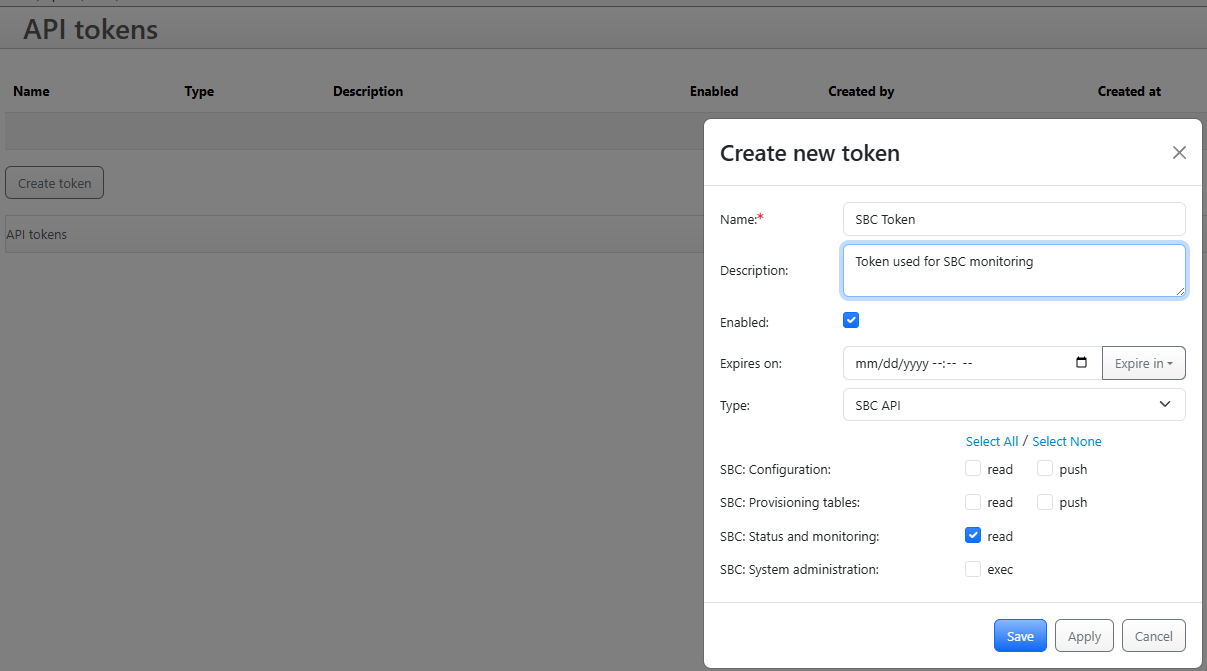
When creating a token:
- Set
Enabledto true - Select
never expirefor a long-lived token - Choose
SBC APIas the token type - Assign
SBC: Status and Monitoringpermissions
Note: The CCM token is optional. It is only required if the current user's permissions do not allow access to the API endpoints.
Method 2: Cookie-Based Authentication (SBC 5.5 and below)
For SBC version 5.5 and below, use cookie-based authentication by including the ccmAuth cookie in the request header.
After configuring tokens via the UI or environment variables, allow 30-60 seconds for the settings to propagate before the dashboard will work correctly.
Required Permissions in CCM
For setting up and accessing the SBC Live Calls Dashboard, ensure you have the following permissions in the CCM for the relevant account:
Only view permissions are required for the following sections
ABC MonitorREST APIMonitoring: Registration cacheMonitoring: Live callsMonitoring: Destination BlacklistMonitoring: Registration cacheMonitoring: Live callsMonitoring: Destination BlacklistMonitoring: Registration AgentsMonitoring: Call Agents statusMonitoring: Conference RoomsMonitoring: System statusMonitoring: User Recent TrafficMonitoring: View logsSystem: Config Groups
Firewall Configuration
If you are using SBC version 5.5 or lower and the firewall is enabled, you need to add a rule to allow the Monitor to access the SBC data. For SBC version 5.6 and above, use SBC API tokens instead.
If the firewall is disabled, you can skip this step.
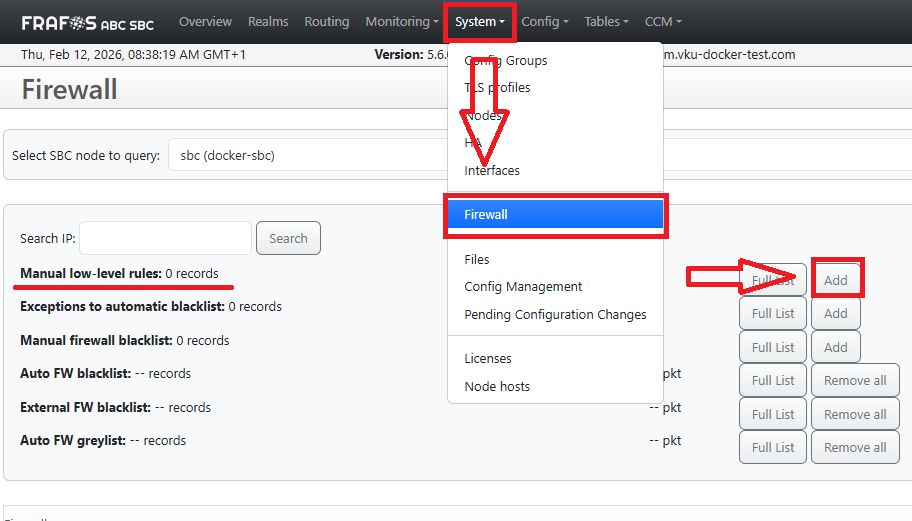
-
Go to
System > Firewalland add to theManual Low Level Rulesthe following rule to allow the Monitor to access the SBC data: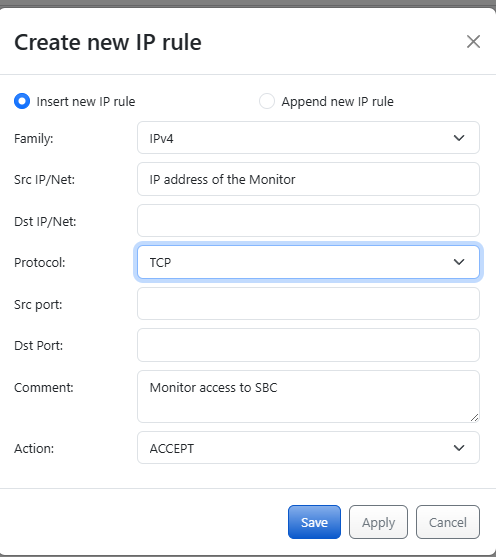
-
Just replace the
src IP addresswith the IP address of the Monitor and save the changes.
Dashboard Overview
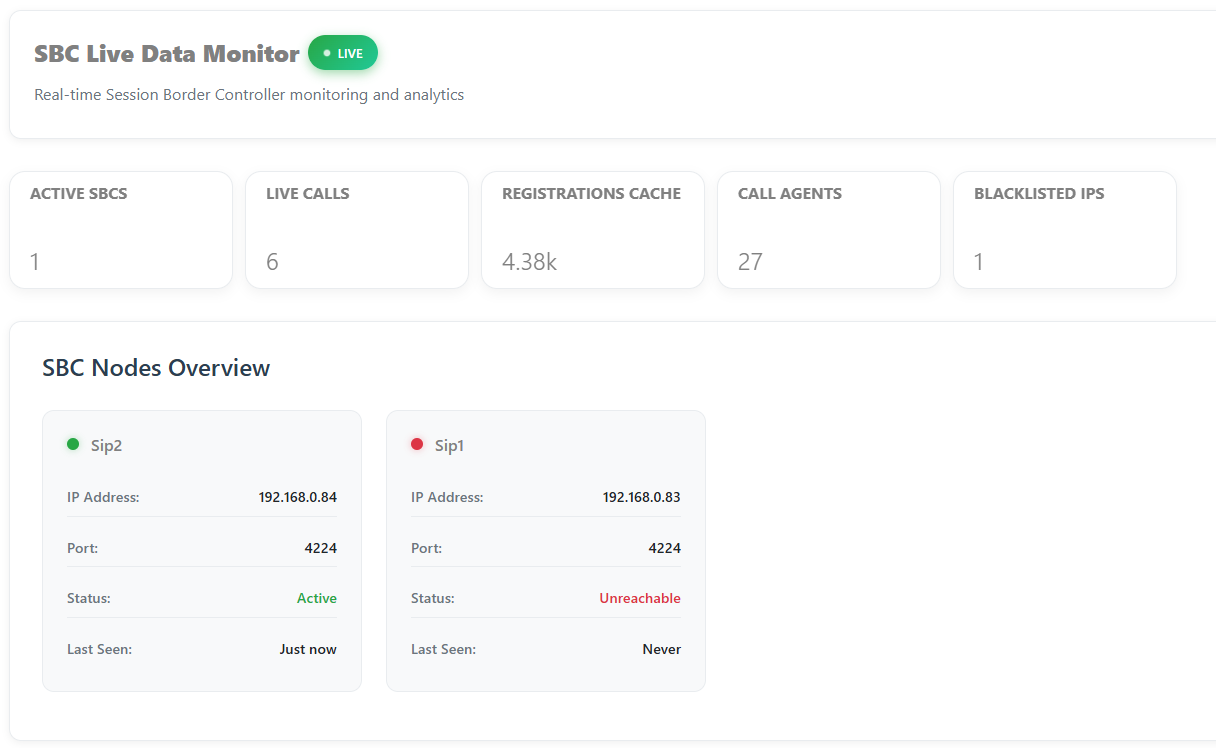
The dashboard features:
- Real-time call statistics
- Active call monitoring
- Quick issue identification
- Visual analytics for efficient troubleshooting
Dashboard Tabs
Easily navigate between different views and data sets:

For more details, explore the tabs above or refer to the documentation sidebar.